

The IP 360 Hub Digital HUB Called
THE IP 360 HUB COMMUNITY
Be Visible. Be Found. Be Part of the Global IP Network
The IP 360 Hub Digital Directory offers you a professional online presence designed to amplify your visibility within the global Intellectual Property community. Every contributor who purchases a branding package, whether for a full-page advertisement, a profile, or a service listing, receives a dedicated digital profile on the IP 360 Hub website as part of the package.
In addition to your digital listing, your package includes exclusive access to the IP 360 Hub Community, a premium contributor-only platform designed to take your presence even further.
About the IP 360 Hub Community
The IP 360 Hub Community is an exclusive online platform available to all clients who purchase a listing or advertising package in the IP 360 Hub directory. Designed to go beyond simple visibility, the community offers a dynamic, interactive space where professionals, firms, and service providers in the Intellectual Property industry can connect, collaborate, and grow their presence in a meaningful way.
What You Can Do in the Community
0 1
Manage Your Profile
Once your plan is activated, you’ll gain access to your private dashboard, where you can build or update your online profile with details such as services offered, contact information, areas of specialisation, and media uploads.
0 2
Expand Your Network
The community enables you to browse and filter other members based on region, service category, or professional type (e.g., attorney, counsel, service provider). Easily discover like-minded peers, potential collaborators, or referral partners.
0 3
Reach Out and Start Conversations
Use the built-in messaging feature to chat directly with other members of the IP 360 Hub Community. Whether you're exploring collaboration, making introductions, or following up on shared interests, the platform makes it easy to reach out in a professional and focused way—all within a secure, industry-specific environment.
0 4
Showcase Services in Detail
List your service offerings with clarity—beyond what's published in the print or digital directory. This allows you to update information in real time and tailor your listing based on industry needs and client expectations.
0 5
Stay Informed and Visible
Being part of the community gives you access to upcoming opportunities, content calls, and exclusive promotional offers. You'll also be first in line for upgrades, featured placements, and new visibility tools as they are rolled out.
Explore How Your Profile Will Appear
on IP 360 Hub
01
My Dashboard
– Full Control at a Glance
The dashboard brings together all the essential tools to help professionals manage their listing, publish content, update account settings, and access visibility features like QR codes. Each panel serves a dedicated purpose, making profile management streamlined and efficient.
Key Sections
-
Profile Overview
-
Publish Content
-
Manage Listing
-
Account Details
-
Free QR Code Image
.png)
02
IP 360 Hub Firm Profile
– Complete Layout Overview
The profile begins with a professional header that introduces the organisation and offers instant interaction options for visitors.
-
Professional Header: Includes firm name, category tag, logo or profile photo, and interactive buttons for review, message, call, and saving the profile.
-
Navigation Tabs: Fixed menu offering smooth access to core sections like Overview, Specialties, Events, Jobs, and Photo Albums.

03
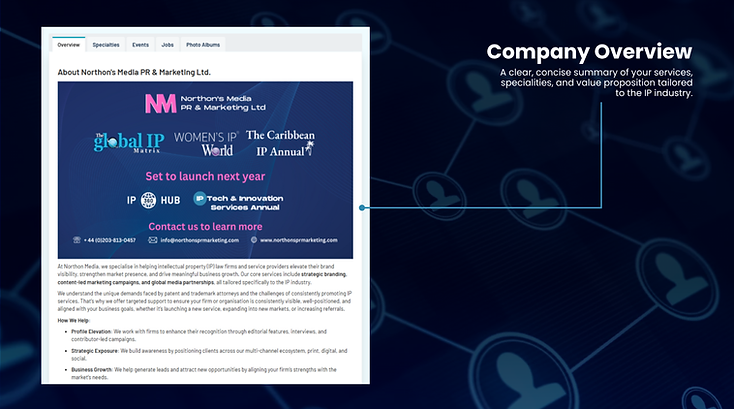
Company Overview Tab
– Showcase the Story and Services
This section introduces the firm through a visual banner and detailed description, presenting its mission, services, and industry role.
-
Branded banner with logo and featured publications
-
Comprehensive company bio with mission and offerings
-
Ideal for presenting value, expertise, and market positioning
-
Highlights industry contribution and areas of focus
.png)
04
Contact Information Section
– Enable Easy Communication
The contact section offers a complete set of tools to initiate direct engagement, connect via social platforms, or schedule appointments.
-
Firm name and website link
-
Integrated meeting scheduler
-
Social media icons (LinkedIn, Instagram, X, Facebook, RSS)
-
Phone number toggle for controlled visibility
-
Full business address displayed for location reference
.png)
05
Specialties Tab
– Spotlight Core Expertise
This section outlines the firm's areas of specialisation, making it easier for visitors to understand service offerings and initiate contact.
-
List of service categories (e.g. Trademarks, Patents, Copyright, etc.)
-
“Request Information” button next to each service
-
Clear layout for straightforward navigation
-
Designed to generate enquiries and build credibility
.png)
06
Events Section
– Promote Industry Engagement
The Events tab highlights participation in international IP events, including speaking engagements and exhibitions.
-
Displays event title, date, time, location, and featured visuals
-
Custom descriptions with booth numbers and highlights
-
“View More” button for complete event information
-
Useful for increasing visibility and attracting in-person engagement
.png)
07
Jobs Section
– Attract IP Marketing & Legal Talent
This section lists available or reference job openings, helping demonstrate team growth and recruitment activity within the firm.
-
Job title with employment type and start date
-
Firm location and role description
-
“View More” button expands the full job details
-
Responsibilities and required qualifications are clearly outlined
-
Reflects professional development and staffing needs
.png)
08
Photo Albums Section
– Capture the Brand in Action
Photo albums showcase real-world engagement through images from events, team moments, and key milestones.
-
Main featured image with supporting photo gallery
-
Written event summary or message
-
Tagging and categorisation for enhanced discoverability
-
“View More” button opens full album
-
Builds visual credibility and demonstrates active involvement in the IP community
.png)
Choose Your Visibility. Amplify Your Reach.
Digital and Print for Maximum Impact
Your inclusion in the Digital Directory and IP 360 Hub Community complements your presence in the annual printed IP 360 Hub directory. The print edition is distributed at major international IP events throughout the year.
This combined visibility ensures you are discovered online and recognised in person by key decision-makers across the global IP industry.